Published: May 13, 2026
SLD Editor
Stop fighting CAD software to ship a job sheet. Solar Proof's SLD Editor draws professional single-line diagrams for solar PV and battery systems in the browser — auto-populated from your quote, multi-inverter capable, print-ready in one click.
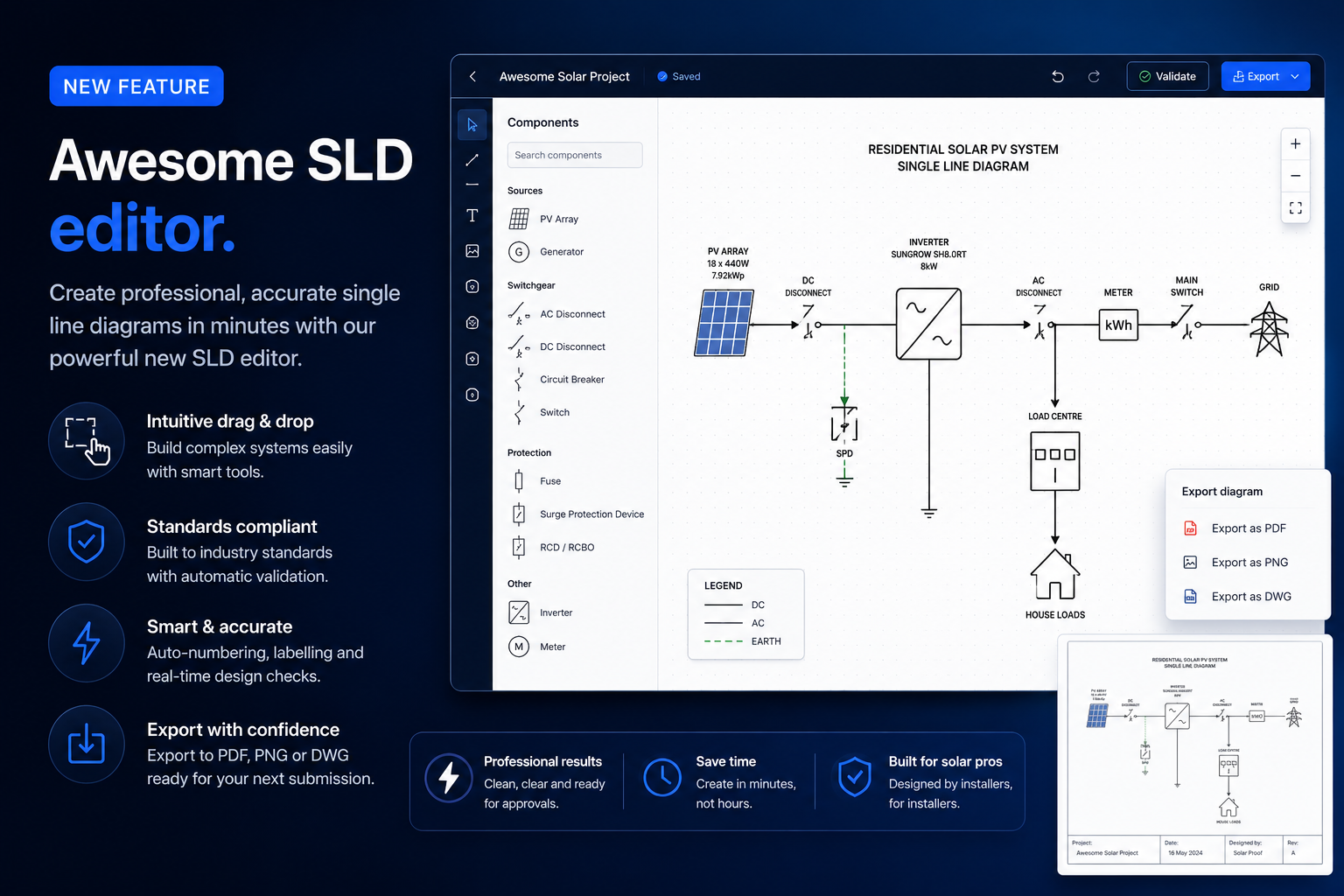
Multi-inverter, multi-string, sub-board diagrams in your browser
Single-line diagrams sit at an awkward spot in the solar workflow. They're required for STC paperwork, retailer applications and install packs, but the tools that traditionally produce them — AutoCAD, Visio, hand-drawn PDFs — don't talk to the rest of your design and pricing stack. The SLD Editor closes that gap. Here's what it does and why it matters:
- What is the SLD Editor?
- How does it work?
- Why a browser-based SLD beats CAD
- How to use the SLD Editor in Solar Proof
Article Contents
What is the SLD Editor?
The SLD Editor is a browser-based tool inside Solar Proof for drawing single-line diagrams of solar PV and battery systems. Drag a symbol, drop it on the canvas, connect the wires — the diagram updates live, and one click exports a print-ready A3 PDF complete with title block, drawing number and revision.
It replaces the typical SLD workflow: opening a CAD file, finding last quarter's similar job, copy-pasting blocks, manually fixing the title block, exporting to PDF, and hoping nothing got misaligned. The SLD Editor uses the equipment list and stringing from your Solar Proof quote as the starting point, so the diagram and proposal stay in sync without manual transcription.
Every symbol you'd expect is there — inverters, batteries, panels, sub-boards, isolators, CTs, metering — pre-wired with sensible defaults. Multi-inverter commercial systems and dedicated sub-boards lay out cleanly without you fighting overlaps.
How Does the SLD Editor Work?
When you open the editor on a Solar Proof project, it pulls the live topology straight from the quote — selected inverter, panel and battery models, quantities, string configuration from the auto-stringing engine, and customer/site details for the title block. A default diagram is generated automatically so you have something to refine, not a blank canvas.
From there, the editor exposes:
- Drag-and-drop symbols — all the standard solar SLD components, pre-wired with the right terminal types so connections snap together correctly
- Per-MPPT string designer — click any inverter to edit its tracker layout. Voltage and current warnings flag oversized strings before they hit a roof
- Multi-inverter and sub-board support — commercial systems with 2, 3, 4+ inverters and dedicated sub-boards lay out without overlap headaches
- Live title block — drawing number, revision, customer details, installer info and your company logo, all editable inline
- Revisions — every change auto-saves. Named revisions let you keep alternative layouts side-by-side for the same job
- Print-ready PDF export — one click produces a properly-formatted A3 (or A4) PDF that drops straight into the proposal or install pack
Because it's a real diagram editor — not a fixed template — you can produce whatever the job needs: residential single-inverter, hybrid with battery, commercial multi-inverter with metering and sub-boards. Same tool, same workflow.
Why a Browser-Based SLD Beats CAD
Traditional SLD workflows have three big problems: cost, friction, and synchronisation.
- Cost — CAD licences run into hundreds of dollars per seat per year. For a small team that draws maybe two SLDs a week, that's serious money for a tool nobody enjoys using
- Friction — CAD has a learning curve. Most installers aren't CAD professionals. Either you train every team member or you bottleneck on the one person who can drive AutoCAD
- Synchronisation — when the panel count changes mid-quote, or the inverter swaps from string to hybrid, the SLD is the last thing that gets updated. Customers regularly receive proposals where the diagram doesn't match the pricing
A browser-based editor solves all three. No licence, no install, runs on whatever laptop the salesperson is using. The learning curve is closer to a presentation tool than industrial CAD — new staff are productive in an afternoon. And because the data source is the quote, the diagram updates as the quote changes, not as a separate manual step.
The most common SLD mistake: A diagram drawn for an earlier version of the quote, never updated when the design changed. The installer arrives on site with paperwork that doesn't match the system. The SLD Editor pulls live from the quote so this can't happen.
How to Use the SLD Editor in Solar Proof
The editor is built into the Solar Proof publish menu. Here's the workflow:
- Design your project as usual — pick panels, inverter, battery, set the string configuration with auto-stringing
- Click the Publish button and choose SLD Editor from the menu
- The editor opens in a new tab with a default diagram pre-populated from your quote
- Refine the layout — drag symbols, edit the title block, adjust strings per MPPT, add sub-boards if needed
- Click Publish PDF to export a print-ready A3 single-line diagram
Every edit auto-saves to a revision against the project, so you can come back to it, compare alternatives, or roll back if you change your mind. The PDF carries your company branding from the user manual setup — logo, address, accreditation numbers — without extra work per project.
For commercial designs, the multi-inverter wizard lets you spin up the right number of inverters and sub-boards in one go, with sensible defaults you can refine. For residential hybrid systems, the battery and BMS symbols are pre-wired so the typical inverter+battery+ATS topology comes out of the box.
Try It Free
The SLD Editor has a standalone free version you can try without signing up — solarproof.com.au/sld/dist/index.html. Drag, drop, export a PDF in your browser, no account required. It runs the same editor as the in-app version, just without the live link to your Solar Proof quote.
The integrated version — auto-populated from your project data, with named revisions and unlimited use across every job — is included with any paid Solar Proof subscription. Trial users on credit-based projects can unlock the integrated editor on In-Depth (3-credit) projects, or subscribe for unlimited use on every quote.
Summary
The SLD Editor takes one of the slowest parts of preparing a quote — producing a presentable single-line diagram — and reduces it to a few minutes of click-and-drag. It runs in your browser, populates from your project data automatically, and exports a print-ready PDF directly into your proposal or install pack.
If you're still drawing SLDs in CAD or copy-pasting from a previous job's PDF, try the free version and see what the workflow feels like without the friction. The integrated experience scales the rest of the way — multi-inverter, sub-boards, revisions, branded title blocks, all included.
Try the free SLD Editor — or start a Solar Proof trial to unlock the integrated workflow.

Chris Taeni - BEngg (Power)
Solar Proof Solutions Pty Ltd
Director